
Bandicam Screen Recorder7.0.2.2138 - Download
You'll be able to download in few seconds.
Publisher Description
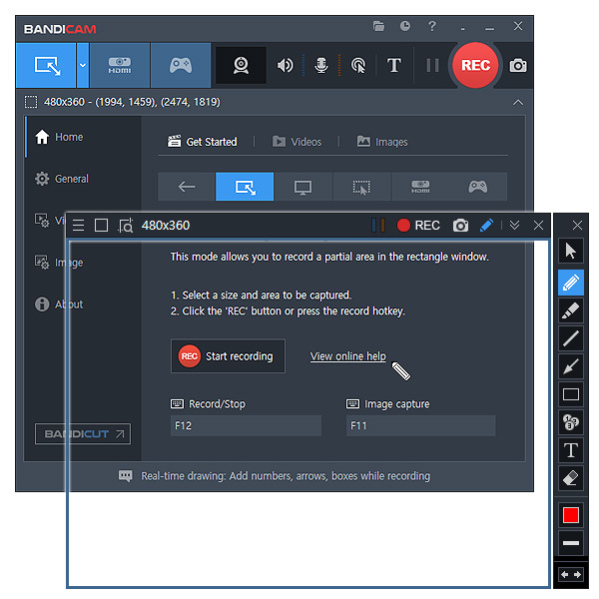
Bandicam is a lightweight screen recorder for Windows that can capture anything on your PC screen as a high-quality video. It also allows you to record a certain area on a PC screen, or capture a game that uses the DirectX/OpenGL/Vulkan graphics technologies.
Bandicam will help you carry out a game capture with high compression ratio, while preserving the video quality of the original work, and provide performance far superior to other screen capture software that provide similar functions.
Bandicam compresses the video while recording and uses fewer CPU/GPU/RAM resources. It also fully supports the hardware accelerated h.264 encoder of Nvidia NVENC/CUDA, Intel Quick Sync video, and AMD VCE which allow videos to be recorded with high speed, high compression ratio, and excellent quality. As a result, there is less lag, and you can save your HDD and CPU.
Bandicam displays the FPS number in the corner of the screen while it is active in the 'Game Recording' mode. It also can record video at resolutions of up to 3840x2160 in high quality (2160P UHD video can be made), allowing your webcam stream to be simultaneously recorded and merged with the game / screen recording (Picture-in-Picture, Video-in-Video).
In addition, Bandicam supports mouse click effects and a real-time drawing function that allows users to draw lines, boxes, or highlights while recording their computer screen.
You can upload the recorded file to YouTube without converting because the recorded file size is 20% to 95% smaller than files created by other software.
Furthermore, Bandicam can simply remove the background of a webcam and make a Chroma Key video in real-time while recording. With the Chroma Key and webcam overlay function being used in conjunction with microphone recording, Bandicam has become the ideal screen recorder for making video tutorials or Let's Play videos.
About Bandicam Screen Recorder
This Screen Capture program is available in English, Arabic, Armenian, Azerbaijani, Bulgarian, Burmese, Chinese, ChineseSimplified, ChineseTraditional, Croatian, Czech, Danish, Dutch, Finnish, French, Georgian, German, Greek, Hebrew, Hungarian, Indonesian, Italian, Japanese, Kurdish, Latvian, Lithuanian, Malay, Norwegian, Persian, Polish, Portuguese, Romanian, Russian, Serbian, Slovak, Slovenian, Spanish, Swedish, Thai, Turkish, Ukrainian, Urdu, Uzbek, Vietnamese. It was last updated on 02 November, 2026. Bandicam Screen Recorder is compatible with the following operating systems: Windows, Windows-mobile.
The company that develops Bandicam Screen Recorder is Bandicam Company. The latest version released by its developer is 7.0.2.2138.
The download we have available for Bandicam Screen Recorder has a file size of 32.5 MB. Just click the green Download button above to start the downloading process. The program is listed on our website since 2023-12-22 and was downloaded 0 times. We have already checked if the download link is safe, however for your own protection we recommend that you scan the downloaded software with your antivirus. Your antivirus may detect the Bandicam Screen Recorder as malware if the download link is broken.
How to install Bandicam Screen Recorder on your Windows device:
- Click on the Download button on our website. This will start the download from the website of the developer.
- Once the Bandicam Screen Recorder is downloaded click on it to start the setup process (assuming you are on a desktop computer).
- When the installation is finished you should be able to see and run the program.
Program Details
General
System requirements
Download information
Pricing
Version History
version 7.0.2.2138
posted on 2023-12-22
1. Bug fixed - The webcam overlay screen wasn't shown in the recorded video under certain conditions.
2. Bug fixed - The scheduled recording function didn't work under certain conditions.
version 7.0.1.2132
posted on 2023-11-14
1. Bandicam now supports the AV1 (NVIDIA NVENC) encoder.
2. Bandicam now supports the AV1 (AMD VCE/VCN) encoder.
3. Added the speaker and microphone volume control function in the main window.
4. Added the output folder button (video, image, audio) in the main window.
version 7.0.0.2117
posted on 2023-10-05
1. Added support for the 'Specific window' recording method (You can now record a selected window even if it is covered by another window.)
2. Added the speaker and microphone device selection menu in the main window.
3. Other minor bugs have been fixed.
version 6.2.4.2083
posted on 2023-07-14
1. Bug fixed - The microphone volume control didn't work properly in Bandicam 6.2.3 under certain conditions.
2. Bug fixed - The recording performance dropped when the UAC window popped up in Screen Recording Mode.
3. Other minor bugs have been fixed.
version 6.2.3.2078
posted on 2023-07-05
1. Improved the screen capture stability when using the enhanced capture method 2.
2. Improved the automatic selection of the enhanced capture method.
3. Bug fixed - Microphone access was shown as On even though the microphone option was turned off.
version 6.2.2.2072
posted on 2023-06-08
1. Added the [All display] option that allows users to record multiple monitors at the same time.
2. Improved the capture selection method for Screen Recording Mode.
3. The black screen issue with some OpenGL games has been resolved.
4. Other minor bugs have been fixed.
version 6.2.1.2068
posted on 2023-05-26
1. Improved the screen recording performance in Windows 10 and 11.
2. Improved the HDR monitor capture performance in Screen Recording Mode.
3. Added the option to save files under a folder in date format (YYYY-MM-DD).
4. Added hotkeys for selecting the recording target area (Ctrl+Shift+F).
version 6.2.0.2057
posted on 2023-04-18
1. Added a Keystroke overlay function in Screen Recording Mode.
2. Added a fullscreen toggle icon to the webcam preview window in Screen Recording Mode.
3. Added a move icon to the webcam preview window in Screen Recording Mode.
4. Improved the performance of blur effect and webcam overlay.
version 6.1.0.2044
posted on 2023-02-28
1. Bandicam now supports the AV1 (Intel Quick Sync Video) encoder.
2. The maximum value of the silent duration in the Auto Complete Recording window has been changed from 999 seconds to 99999 seconds.
3. The recorded videos were too bright when capturing HDR monitors in Screen Recording Mode.
version 6.0.6.2034
posted on 2022-12-28
Bug fixed - BandiFix didn't repair broken MP4 files properly from version 6.0.1.
Disclaimer
External Download
We do not host Bandicam Screen Recorder on our servers. We did not scan it for viruses, adware, spyware or other type of malware. This app is hosted by the software publisher and passed their terms and conditions to be listed there. We recommend caution when installing it.
The external download link for Bandicam Screen Recorder is provided to you by apps112.com without any warranties, representations or guarantees of any kind, so access it at your own risk.
If you have questions regarding this particular app contact the publisher directly. For questions about the functionalities of apps112.com contact us.
